
Understand the boundary
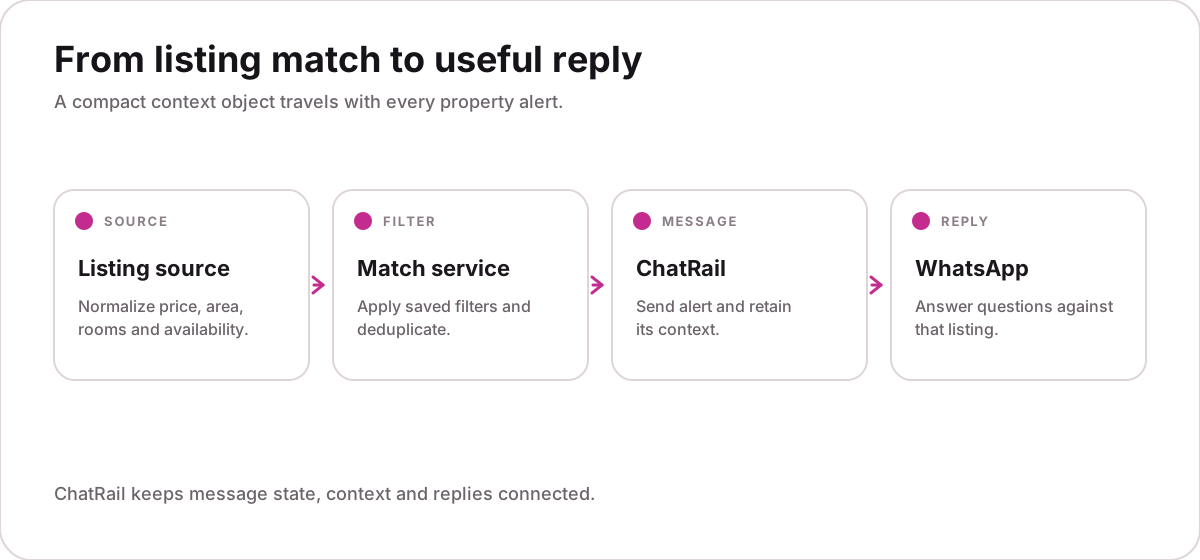
Your application decides which listings match each subscriber. ChatRail receives the selected listing, sends the alert and keeps later replies connected to the context supplied with it.
| Concern | Owned by | Responsibility |
|---|---|---|
| Listings and saved searches | Your application | Collect, normalize and match |
| Delivery and read state | ChatRail | Track and emit status events |
| Reply correlation | ChatRail | Relate a response to its alert |
| Viewing request | Your application | Validate and complete the booking |
Define a stable context contract
Attach only the facts a recipient may ask about. Use normalized values, a schema version and an observation timestamp so your application can identify stale information.
{
  "schema": "property_listing.v1",
  "listing_id": "7821",
  "observed_at": "2026-09-14T16:30:00Z",
  "price": { "amount": 1850, "currency": "USD", "period": "month" },
  "location": { "city": "Austin", "area": "North Loop" },
  "features": ["2 bedrooms", "reserved parking"],
  "availability": { "from": "2026-10-01", "status": "available" },
  "source_url": "https://example.com/listings/7821"
}Send the alert once
Use a deterministic idempotency key derived from the listing revision and recipient. Retrying the same request should return the original result rather than create a duplicate message.
curl -X POST https://api.chatrail.dev/v1/messages/text \
  -H "Authorization: Bearer $CHATRAIL_KEY" \
  -H "Content-Type: application/json" \
  -H "Idempotency-Key: listing-7821-r3-user-418" \
  -d '{
    "connection": "homefinder",
    "to": "+14155550142",
    "body": "New match: 2-bed apartment in Austin for $1,850/month.",
    "context": {
      "schema": "property_listing.v1",
      "listing_id": "7821",
      "price": { "amount": 1850, "currency": "USD" },
      "availability": { "from": "2026-10-01" }
    }
}'202 Accepted · message queued · context attachedA successful API response means ChatRail accepted the request. It does not mean WhatsApp has delivered or read the message.
Suppress noisy updates
Do not send an alert simply because a collector found a row. Build a stable fingerprint from fields that matter to the subscriber and send only when the listing is new or meaningfully changed.
- Normalize currency, dates and neighborhood names.
- Reject records without a stable identifier or observation time.
- Keep a per-recipient suppression window.
- Increment the revision only when price, availability or material features change.
Route questions and actions differently
Read-only questions may be answered from current context. A viewing request creates an external commitment and must be completed by your application.
| Recipient reply | Route | Why |
|---|---|---|
| “Does it have parking?” | Context answer | Bounded, read-only fact |
| “Is it still available?” | Refresh source | Availability can change |
| “Book Saturday at 2 pm” | Application workflow | Creates an external commitment |
| “Stop sending these” | Immediate opt-out | Consent must take priority |
Verify and process the reply
Verify the webhook signature against the raw request body, respond quickly and move database or AI work to a queue. Deduplicate with the event identifier because delivery is at least once.
{
  "type": "message.received",
  "event_id": "evt_01...",
  "message_id": "msg_01...",
  "reply_to": "msg_original_alert",
  "conversation_id": "conv_01...",
  "context": { "listing_id": "7821", "schema": "property_listing.v1" }
}Test the complete conversation
Test the workflow as a conversation, not just an API request. Use an internal recipient and verify every boundary before allowing production traffic.
- Send twice with the same idempotency key.Only one WhatsApp message should be created.
- Reply to the alert.The webhook should carry the correct listing and original message identifiers.
- Change a time-sensitive field.The application should refresh availability before answering.
- Send an opt-out.The next scheduled alert must be suppressed.
- Disconnect the linked number.New sends should pause and the connection should require operator attention.
Production checklist
- Recipient consent recorded
- E.164 numbers normalized
- Idempotency keys deterministic
- Context schema versioned
- Source freshness enforced
- Webhook signatures verified
- Retries bounded
- Opt-outs immediate