
The shape of the flow
Four steps, built from Activepieces' generic pieces: the Webhook piece catches the event, a Branch keeps only images, the HTTP piece fetches the file from ChatRail with your API key, and a storage piece uploads it. Because the HTTP piece can send an authorization header and return binary, no ChatRail-specific piece is needed.
Activepieces ships a native WhatsApp Business piece, but that talks to Meta's official Cloud API — a different transport from ChatRail's linked-device connection. This flow uses the Webhook and HTTP pieces instead.
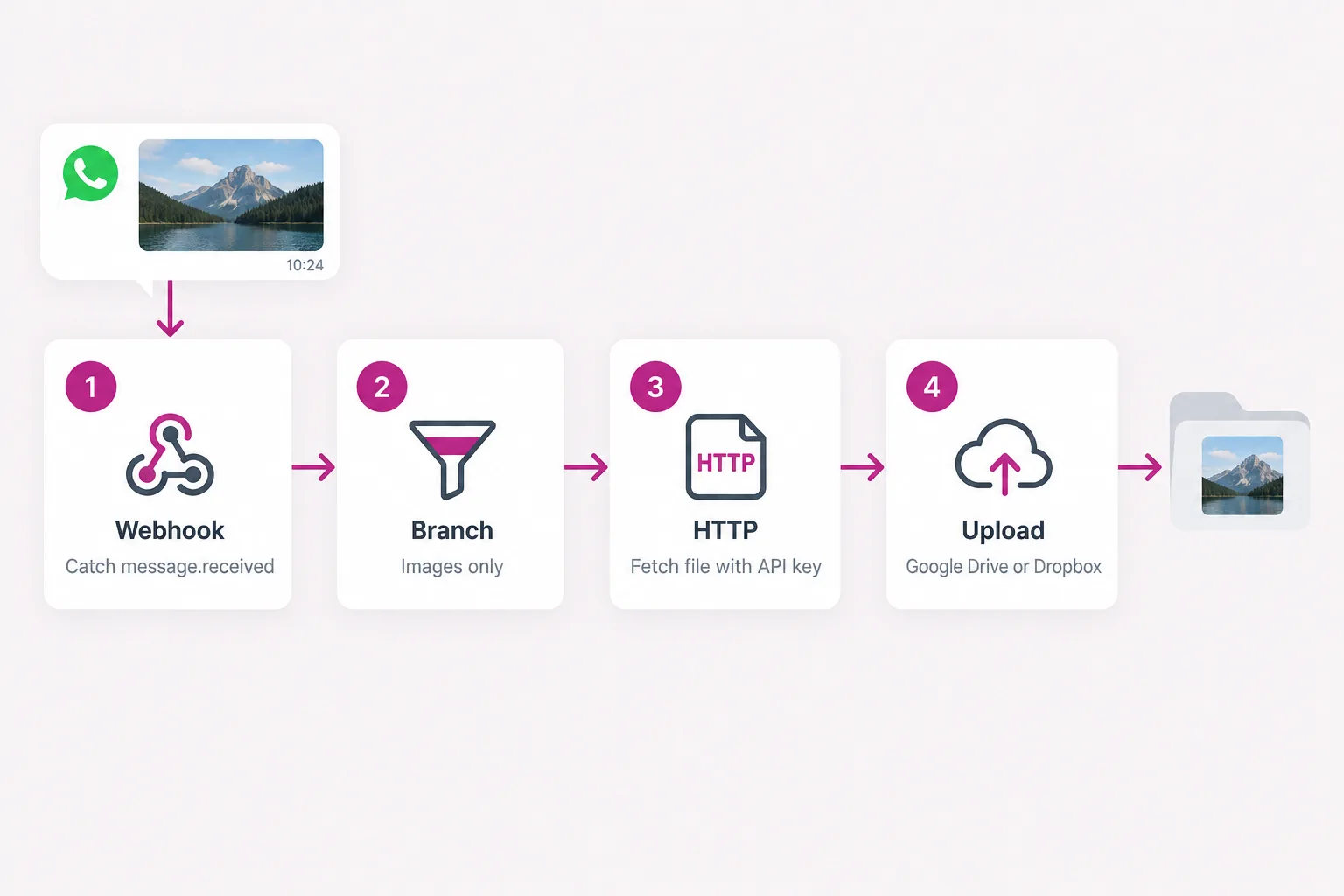
1 · Catch the webhook
Add the Webhook piece with the Catch Webhook trigger (it accepts any HTTP method). Publish the flow, copy the webhook URL, and register it with ChatRail for message.received:
curl -X POST https://www.chatrail.dev/v1/webhook-endpoints \
  -H "Authorization: Bearer $CHATRAIL_API_KEY" \
  -H "Content-Type: application/json" \
  -d '{
    "url": "https://your-activepieces-host/api/v1/webhooks/FLOW_ID",
    "events": ["message.received"]
  }'
Send a photo to the linked number so the flow captures sample data. The event fields sit under body.data — body.data.kind, body.data.media.download_url and, for a group, body.data.from.group.
2 · Branch on images
Add a Branch step so only image events continue. A text reply has no file, and a photo the transport will not serve has a null URL:
{{trigger.body.data.kind}}                 (Text) Exactly matches   image
{{trigger.body.data.media.download_url}}   Is not empty
To limit it to one group, add {{trigger.body.data.from.group}} exactly matches your group id from the groups endpoint. Put the rest of the flow on the True branch.
3 · Fetch the file with the HTTP piece
On the True branch, add the HTTP piece, action Send HTTP request. Set the method to GET, build the URL from the download reference, send your API key as a header, and turn on Response is Binary so the bytes come back as a file:
Method             GET
URL                https://www.chatrail.dev{{trigger.body.data.media.download_url}}
Headers            Authorization: Bearer YOUR_CHATRAIL_API_KEY
Response is Binary  ON
Prefixing the API base makes the stored path absolute. Keep the key in the header, never in the URL. The step's output is the file you hand to the upload.
4 · Upload to Google Drive or Dropbox
Add the storage piece and point its file field at the HTTP step's output.
- Google Drive → Upload File: set File to the Send HTTP request output, name it (for example
whatsapp-{{trigger.body.data.message_id}}.jpg) and choose a folder. - Dropbox → Upload File: set File to the same output and give a path such as
/WhatsApp images/.
Publish the flow and share a photo in the group to confirm it lands in storage.
Notes
ChatRail signs every delivery with chatrail-signature over the raw body; if you want to verify it, do so in a Code piece before the branch. On a self-hosted instance the webhook URL is on your own domain, so keeping it unguessable is the baseline. An outbound attachment has no download_url — this flow only ever fires on inbound media.